The seamless swithing between conversation tabs and responses by the AI as well as actual performance of the app- R studio fork- has become very slow and lagging. When I open the app, it takes another five minutes before it responds to any click or keyboard entry. This is the same computer i have used it on and it cannot be an issue with the computer or memory. Once it runs for sometime, it gets stuck and then the app goes blank and closes all tabs (Rmd’s) open. When i end task through windows task manager after a long while, all changes the AI made or I made during the R session are not recovered or saved even though i saved them prior to the app crashing. This has become very inconvenient.
Hi Kwesi, sorry to hear that - let me see if I can fix it. A few questions so I can try to diagnose the issue:
- How long are the conversations you have before it starts to get stuck?
- Do you have it on auto-accept edits mode, and if so, how many files are open with changes?
- Does the same issue arise just with Rao being open for a long time or only with a lot of AI usage?
- Is there any other obvious triggers of the slow-down such as particular code the AI is trying to run or particular files that seem to be problematic?
Will
Hi Will,
Thanks for responding.
- After the most recent update, between responses to my first and second prompts, it gets stuck, takes a while to even get started.
- I had it on manual accept, but when i realised it was taking too long, even when i did click on accept, i switched to auto accept and it still would get stuck and crash.
- I have seen it with Rao usage. I have been working in R studio and i havent had this happen. It does seem to happen with AI use, but i have noit troubleshooted it that way.
- I dont think its a file specific problem, beacuse it has happened with other files as well.
And a few more questions:
- Which model are you using?
- If you look at your task manager, does CPU or memory shoot up when it’s stalling?
- Are you in a root directory or somewhere that would have a lot of files propagating out from the current working directory?
- Claude
- Not particularly. Just rises as it would normally when responding, and then it crashes and memory usage drops.
- I moved the file to document and its still the same.
Sorry, what did you mean with (3)? When Rao runs, it constructs a file tree from your local directory as context, so my first guess was that somehow the file tree is getting particularly large and causing issues. Do there happen to be any rg or ripgrep processes running when it gets slow?

No
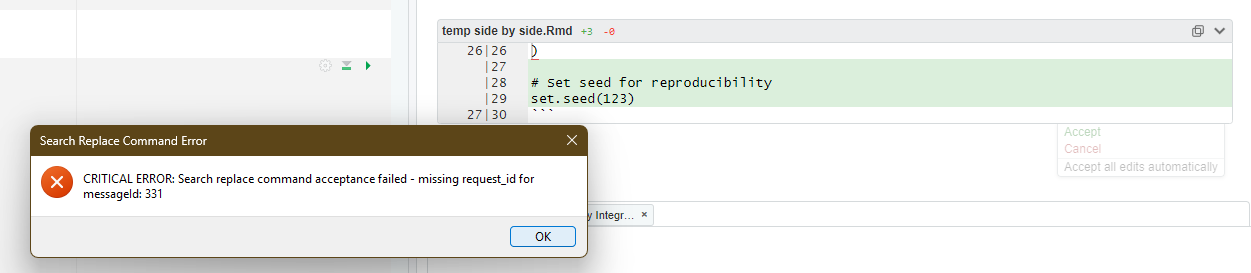
I have attached screenshots of when it gets stuck. Also another screenshot of the task manager when it is stuck.
Does it always get stuck on that particular missing request_id message? (Did you attach more than one screenshot? I only see that one and the task manager, but that might be a discourse quirk.)
Sorry for the delay in getting back. I occasionally get this request_id message when it fails to write my edits. But I do not know if that is the reason it crashes. But it does happen a lot—it fails to write even after accepting edits (which it is supposed to do automatically).
Thanks for sending all this - this should be enough for me to look into it. In the meantime, if you want to try Erdos (lotas.ai/erdos), it has much better support for the concurrent tasks that might be slowing down Rao. Almost all of the functionality in Rao is replicated in Erdos, and all your account information and query counts transfer automatically.
Sure, thanks. Will take a look.